

FL Studio: The DAW That Just Keeps Giving 2026
FL Studio is a powerful and beginner-friendly digital audio workstation from Image-Line, trusted by millions for its pattern-based workflow, legendary piano roll, and extensive built-in instruments and effects. The latest 2026 update brings AI-powered stem separation, a redesigned FLEX plugin, cloud project backup, a new Transmitter processor, and eight free Core Series sound packs, all while using up to 50% less CPU. With editions starting at $99, free lifetime updates, and a massive community of tutorials and support, it remains one of the best value DAWs for electronic, hip-hop, rock, and pop producers, whether you're just starting out or working in a professional studio.
- Free
- Windows
- Nov 5, 2026
Screenshots
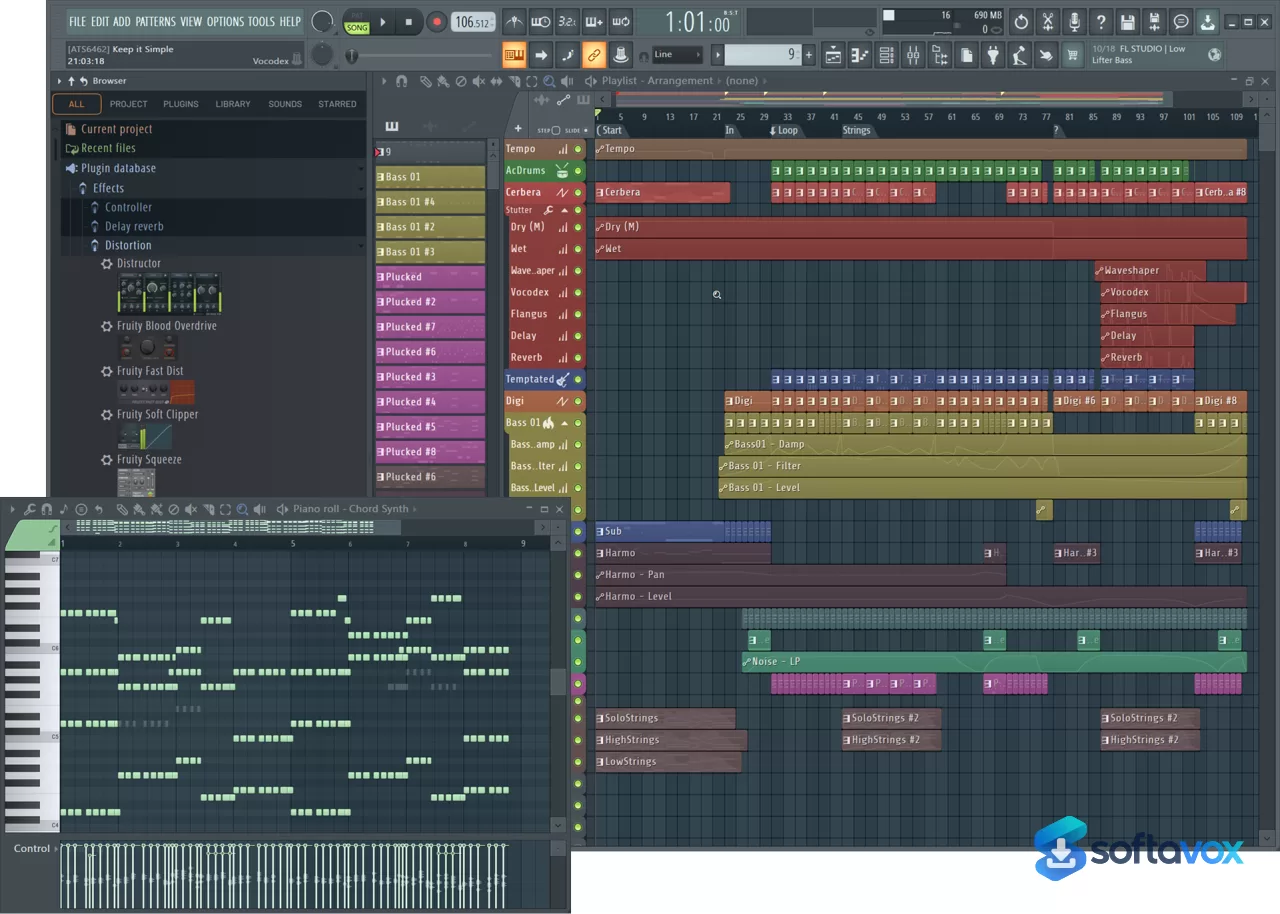
About FL Studio: The DAW That Just Keeps Giving
FL Studio Download, Music Production DAW Software
TL;DR Quick Take / Who is this for?
FL Studio is Image-Line’s digital audio workstation, and it remains the most direct path from a musical idea to a finished track for beatmakers, electronic producers, and hip-hop creators. The current release is FL Studio 2026, version 26.1.6, which arrived as a free update for all existing licence holders under Image-Line’s lifetime free updates policy. The 2026 cycle brought a redesigned FLEX instrument, secure cloud project backup, the Gopher assistant, and an expanded Loop Starter library. The workflow is built around a step sequencer and piano roll that many producers consider the fastest in the industry, and the pattern-based arrangement makes sketching beats unusually quick. The trial is fully functional and never expires, you can use every plugin and feature, export finished songs, and learn the entire program before spending anything. The only trial limitation is that saved project files cannot be reopened until you buy a licence. The catch is the learning curve and the interface. New users frequently describe the UI as messy and the drag-and-drop system as unintuitive at first, and the layout does not follow the conventions of other DAWs. Customer support also draws consistent criticism, which is reflected in Image-Line’s low Trustpilot score even though product ratings sit much higher. FL Studio is the right pick for producers who want a fast, pattern-based workflow with a one-time purchase and lifetime updates. It is not the best choice for users who need a conventional linear recording workflow or responsive vendor support.
Quick Info Box
| License Type | Paid, one-time purchase with Lifetime Free Updates (trial available) |
|---|---|
| File Size | Approx. 1.03 GB (Windows); 1.10 GB (macOS) |
| OS Compatibility | Windows 10/11 (64-bit); macOS 10.15.7 or newer (Intel and Apple Silicon) |
| Latest Version | 26.1.6.5639 (Windows); 26.1.6.5406 (macOS) |
| Developer | Image-Line (Belgium) |
Key Features & Real-World Usability
FL Studio’s centrepiece is the piano roll, a MIDI editing environment that producers routinely describe as the best in any DAW. It supports chord stamps, scale highlighting, per-note automation, and rapid drawing tools that make melody writing feel immediate. The step sequencer and pattern system sit alongside it, letting you build drum grooves and short loops, then arrange those patterns into a full song on the playlist. The 2026 release added a fully redesigned FLEX instrument with a new browser and preset system, secure cloud project backup so work is not lost if a drive fails, an AI-assisted Gopher feature for locating tools and settings, and a substantially expanded Loop Starter library for getting ideas moving quickly. The edition structure is one of FL Studio’s strongest practical advantages. Fruity Edition starts at $99 and covers pattern sequencing and basic production. Producer Edition at $139 (currently discounted from $179) is the most popular choice and adds full audio recording, playlist editing, and stem separation. Signature Bundle at $199 adds Gross Beat and vocal tools, while All Plugins Edition at $224 (discounted from $449) includes every native plugin, including Harmor, Sakura, and Kepler Exo. Every edition includes lifetime free updates, so a purchase made years ago still receives the newest version at no extra cost. The limitations are mostly about interface and stability. The layout does not follow standard DAW conventions, and new users report a steep initial learning curve. Crashes and performance slowdowns on older hardware with heavy plugin loads are recurring complaints. Audio recording and editing are functional but less refined than in DAWs built around linear workflows, and the advanced features often require external tutorials to understand.
- Industry-leading piano roll: Chord stamps, scale highlighting, per-note automation, and fast drawing tools make melody and harmony writing unusually quick.
- Pattern-based workflow: Build drum grooves and loops in the step sequencer, then arrange patterns into a full song on the playlist.
- FL Studio 2026 additions: Redesigned FLEX instrument, secure cloud project backup, the Gopher assistant, and an expanded Loop Starter library.
- Full audio recording (Producer Edition and up): Record vocals and instruments, edit audio in Edison, and split tracks into stems for remixing or mixing.
- Lifetime Free Updates: Every paid edition receives all future versions, plugins, and features at no additional cost, unlike DAWs that charge for major upgrades.
- Edition flexibility: Start at $99 with Fruity Edition, then upgrade later by paying only the price difference, so nothing is wasted.
- Extensive native plugin library: Producer Edition includes 93 plugins, Signature 103, and All Plugins Edition 119, covering synths, effects, and mastering tools.
- Fully functional trial: Use every feature and plugin indefinitely, export finished tracks, and only commit when you need to reopen saved projects.
Pros, Cons & Community/User Feedback
Product ratings for FL Studio are consistently strong, while company-level support ratings tell a different story. On Software Advice, FL Studio holds a 4.7 average with an ease-of-use score of 4.3 and a value-for-money score of 4.6. Capterra records 4.7 from 254 reviews, and GetApp shows 4.8 overall with 99% of users likely to recommend it. Equipboard, which aggregates musician reviews, scores FL Studio 4.5 from 579 reviews and 2,045 ratings, ranking it among the top DAWs. Reviewers repeatedly highlight the workflow: one user describes it as “an amazing tool to learn how to compose and create your songs,” and another says it is “great fun, allows for pro and novice to explore music creation through building and editing samples and loops.” Long-term users emphasise the lifetime updates: a reviewer with years of experience calls it “one of the best long-term investments,” and another notes that “lifetime updates with all the quality-of-life improvements and extra features is insane.” The complaints are equally consistent. The interface is the most common target: reviewers describe it as “messy,” with a drag-and-drop system that “often isn’t intuitive,” and new users report that the many functions are overwhelming at first. Advanced features “necessitate the use of instructional resources,” meaning the program is rarely self-explanatory beyond the basics. Stability is another recurring theme: one Capterra reviewer describes a “love and hate relationship” driven by “annoying crashes” and a “complex UI,” and users on older MacBooks report slowdowns when many plugins and patterns are active. Customer support is the sharpest criticism. Capterra reviews include the blunt assessment “No support at all, no replies to email,” and Image-Line’s Trustpilot score sits between 2.4 and 2.8 out of 5, with reviewers separating the product they love from the support they do not. The practical takeaway is that FL Studio’s creative tools and pricing model are widely praised, while its interface, stability on older hardware, and customer service are the areas where expectations should be managed.
Pros
- Best-in-class piano roll that makes melody and chord writing fast and intuitive
- Pattern-based workflow that suits beatmaking and electronic production especially well
- One-time purchase with Lifetime Free Updates, no subscription and no upgrade fees
- Entry price of $99 with the option to upgrade later by paying only the difference
- Fully functional, non-expiring trial that lets you learn the entire program before buying
- Strong product ratings across Software Advice, Capterra, GetApp, and Equipboard
- Large native plugin library, from 93 plugins on Producer Edition to 119 on All Plugins
- 2026 release adds cloud project backup, redesigned FLEX, and Gopher assistance
Cons
- Interface is widely described as messy and unintuitive for new users
- Steep learning curve, with advanced features requiring external tutorials
- Crashes and performance slowdowns reported, particularly on older hardware with heavy plugin loads
- Customer support is consistently criticised, reflected in a 2.4–2.8 Trustpilot score for Image-Line
- Audio recording and editing are less refined than in linear-workflow DAWs
- No conventional linear arrangement view by default; the playlist works differently from other DAWs
- Trial cannot reopen saved projects, which limits long-term evaluation of a single project
Final Verdict & Safe Download Advice
FL Studio earns a strong recommendation for producers who want the fastest route from an idea to a beat, backed by a pricing model that respects long-term ownership. The piano roll and pattern workflow are genuinely best-in-class for electronic and hip-hop production, the edition structure lets you start at $99 and upgrade without wasting money, and lifetime free updates mean a purchase made today still receives new versions years from now. The fully functional trial is one of the most generous in music software, and it lets you verify performance on your own hardware before spending anything. The caveats are real. The interface does not follow standard DAW conventions, crashes are reported on older machines, and support is the weakest part of the experience. If you need a conventional linear recording workflow or dependable vendor support, other DAWs may fit better. If you want a creative tool that grows with you and never charges for updates, FL Studio is one of the best values in music production. Install the trial, build a few full tracks, and buy the edition that matches the features you actually use.
- Download only from image-line.com: The official Image-Line site and the in-app installer are the only legitimate sources. Third-party “FL Studio full version” pages frequently distribute cracked installers bundled with malware, and these are a common vector for infostealers.
- Verify the installer size and version: The Windows installer is approximately 1.03 GB and the macOS installer is approximately 1.10 GB. The current version is 26.1.6. A dramatically smaller file or an older version number is a warning sign.
- Check system requirements before installing: FL Studio requires Windows 10 or 11 (64-bit) or macOS 10.15.7 or newer, a 2 GHz processor with SSE2 support, 4 GB of RAM, and 4 GB of free disk space. ARM is not supported on Windows.
- Do not use cracked or “All Plugins unlocked” builds: FL Studio’s trial already includes every feature and plugin, so there is no functional reason to risk a repacked installer. Cracked music software is a frequent target for credential-stealing malware.
- Buy directly from Image-Line or an authorised retailer: Purchasing through the official site or a recognised music retailer ensures your licence is registered to your account and eligible for lifetime free updates. Unregistered resold licences may not transfer.
- Back up project files independently: The 2026 release adds secure cloud project backup, but keeping local copies of your .flp files on a separate drive remains the safest practice against drive failure or account issues.
Similar software







Key features
- FL Studio 2026, version 26.1.6, free update for existing licence holders
- Industry-leading piano roll, chord stamps, scale highlighting, per-note automation, fast drawing tools
- Pattern-based workflow, step sequencer + playlist for fast beatmaking and arrangement
- Full audio recording and editing, Producer Edition and above; stem separation included
- 2026 additions, redesigned FLEX instrument, secure cloud project backup, Gopher assistant, expanded Loop Starter library
- Lifetime Free Updates, one-time purchase; all future versions and features included
- Edition flexibility, Fruity $99**, Producer **$139 (discounted from $179), Signature **$199**, All Plugins **$224** (discounted from $449); upgrade by paying only the difference
- Large native plugin library, 93 plugins on Producer, 103 on Signature, 119 on All Plugins
- Fully functional non-expiring trial, use every feature and plugin; only limitation is saved projects cannot be reopened until purchase
- Platforms, Windows 10/11 64-bit; macOS 10.15.7+ (Intel and Apple Silicon)
- Installer size, approx. 1.03 GB Windows, 1.10 GB macOS
Frequently asked questions about FL Studio: The DAW That Just Keeps Giving
Is FL Studio safe to download?
Is FL Studio free?
Which systems does FL Studio run on?
What is FL Studio used for?
How is FL Studio different from Ableton Live?
Can I save my projects in the trial version?
How do I update FL Studio?
What’s new in FL Studio: The DAW That Just Keeps Giving 2026
Official Release Notes & Changelog
For the most accurate and detailed information, you can refer to these official Image-Line resources:
Official "What's New?" Page: This is the primary source for all new features and improvements introduced in FL Studio 2026.
Official Change Log: For a complete log that includes bug fixes and minor updates (like the 26.1.5 and 26.1.7 releases), you should check the dedicated "WhatsNew" change log page.
🚀 FL Studio 2026: Key Features (Initial Release - July 7, 2026)
The initial release of FL Studio 2026 brought several significant updates focused on performance, workflow, and new creative tools.
Redesigned FLEX: The popular FLEX plugin was completely rebuilt. It features a new synthesis engine that can reduce CPU usage by up to 50% on second-generation packs, a redesigned UI, better search, and a random-preset button.
FL Cloud Project Backup: All users now have access to automatic project backups to FL Cloud. The free tier includes 500 MB of storage, with Plus and Pro tiers offering 5 GB and 1 TB respectively.
Gopher AI Assistant: An updated AI assistant capable of performing tasks within your project, such as stem separation or loading tracks with a single click.
New Transmitter Plugin: An effects plugin that splits an incoming signal into its transient and sustain components, allowing for independent processing of each part.
Audio Logger: A new tool in the Tools Menu that continuously records the last 60 seconds of audio from the Master Mixer Track, similar to the existing MIDI Logger.
New Tools & Workflow Enhancements:
Chord Progression Tool: Added to the Tools Menu to assist with chord creation.
Remix a Song: A new Welcome Window option that loads and stem-separates a track in the Playlist with a single click.
Chord Detection Panel: A toolbar panel that detects chords from MIDI input, typing keyboard, or piano roll selections.
Core Series Sound Packs: Eight new free sound packs containing over 200 presets were made available to all FL Studio users.
🔧 Subsequent Updates & Changelog Highlights
Following the initial release, Image-Line has rolled out several updates. Here are the key changes from the changelogs:
FL Studio 26.1.5 (August 18, 2026):
Added a 24-bit option to the mixer's Disk Recording menu.
Added a Delete option to the channel settings window's menu.
FL Studio 26.1.7 (October 1, 2026)
Bug Fixes: Addressed a crash that occurred after undoing the "Trim unused mixer tracks" action (issue 22710) and a crash when building the browser cache (issue 22727)
Versions
| Version | Release date | Platform | File size | |
|---|---|---|---|---|
| FL Studio: The DAW That Just Keeps Giving 2026 Latest version | Jul 7, 2026 | Windows | 926.0 MB | Download |
Comments about FL Studio: The DAW That Just Keeps Giving
No comments yet. Share your experience with this program!